
Outreach that reads like you wrote it.
From your own domain, in plain text or with your logo and signature. You approve every email. It follows up, and stops the moment they reply.
Create your account Solo from £25 a month, including VAT. Ten minutes to set up.

Where Waving fits.
You know your ideal customer. Your lead tool finds them. Waving does the part in between: the first email, the follow-up, and the reply.
- You Ideal customer profile Who you sell to. Sector, size, region, role.
- Your lead tool Find the people Any tool you like. Push them in by API, MCP or by hand.
- Waving First email and follow-up From your own domain, with your signature. You approve. It sends, paces and follows up.
- Result Replies Every reply in one place, ready for a call or your CRM.
Most cold outreach tells on itself.
Tools announce themselves.
Bulk headers, rewritten links and glossy templates say campaign. The inbox files it as one.
Someone else's domain.
Gmail shows "via". The reader knows.
Follow-ups by hand.
You forget one. Or send one to someone who already replied.
More is not the lever.
Waving throttles, paces across the day, and warms a domain up slowly.
Waving is
- Plain text, or HTML with your logo.
- Sent from your own domain.
- One recipient at a time.
- A follow-up that stops itself.
- Every reply in one place.
Waving is not
- A lead finder.
- A campaign blaster.
- A CRM you live in.
- A shared sending domain.
- A LinkedIn bot.
How B2B outreach works in Waving. You read every email before it goes.
-
1
Connect your domain.
Add the DNS records once. Nothing sends until they pass.
-
2
Bring your leads.
API, MCP server, or by hand. Keep whatever you use to find people.
-
3
Read and approve.
Not optional. Cannot be switched off.
-
4
It sends and follows up.
Paced across the day. Any reply cancels the follow-up.
Inside Waving
The real screens, with made-up leads.
This is the app as you will use it. The business and the people in these pictures are invented.
Read every email before it goes.
Every email your agent writes waits here with its checks. Open one to read the first email and the follow-up, change a word or reject it. Or tick the good ones and approve them together.
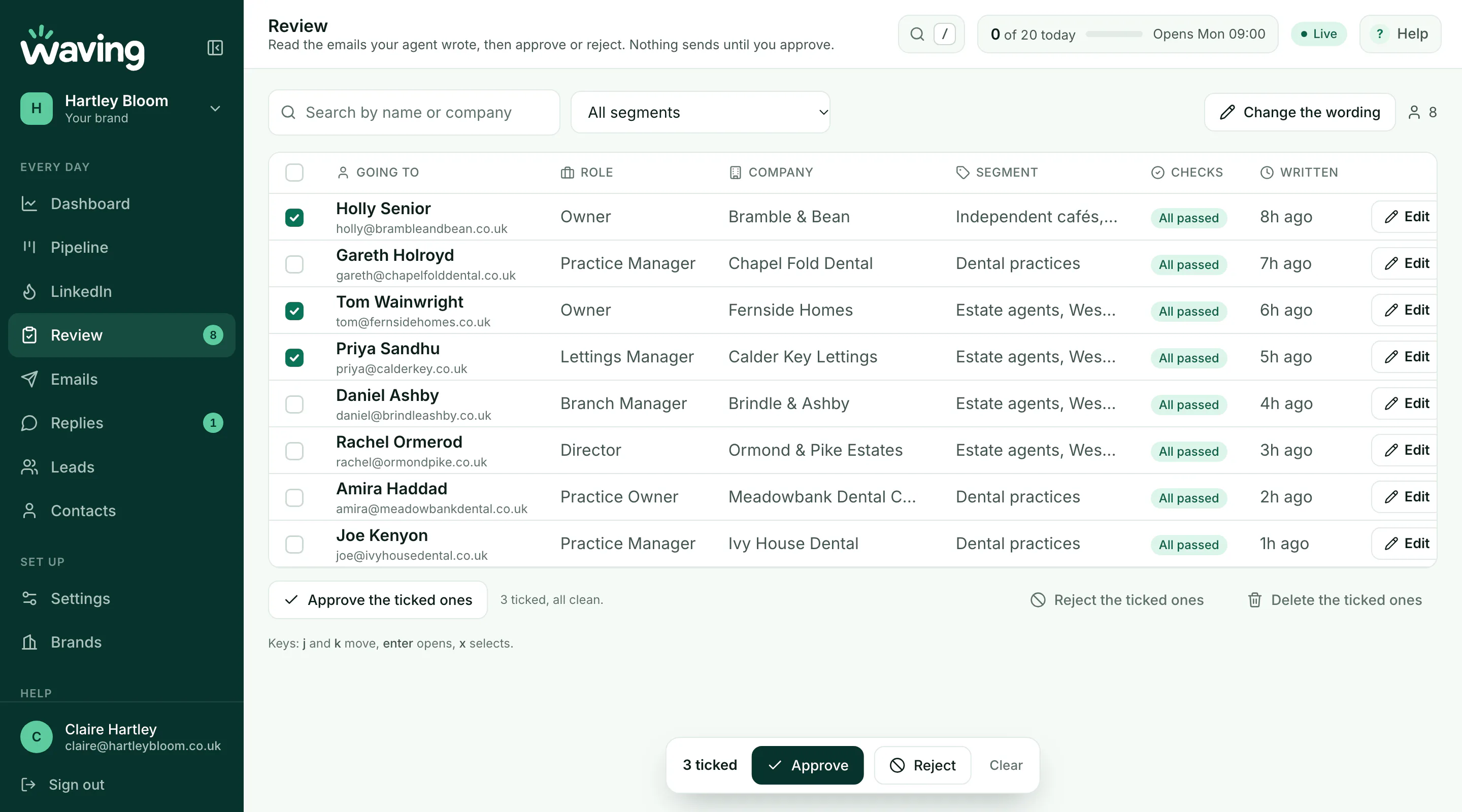
Tap the picture to see it full size.
Change one email, or all of them.
Edit any email that has not gone. Or write one version for a whole segment and Waving puts in each lead's name and company. Approved emails stay approved if they still pass their checks.
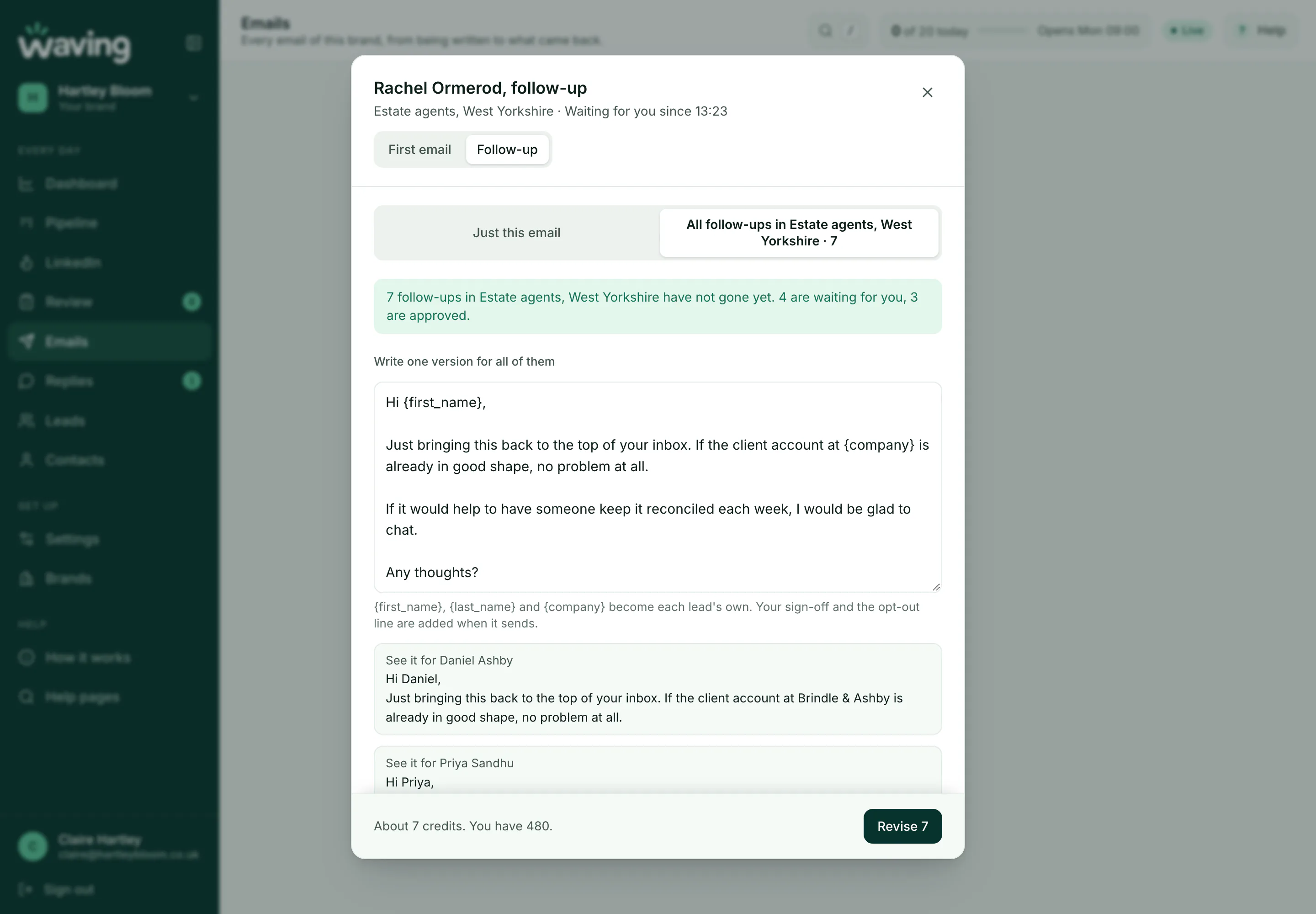
Tap the picture to see it full size.
A proper signature, with your logo.
Your name, phone, website and company details in one tidy style, with the logo beside, above or below. Plain text as standard, or an HTML version with your logo when you switch on opens. See it as they will before you save.
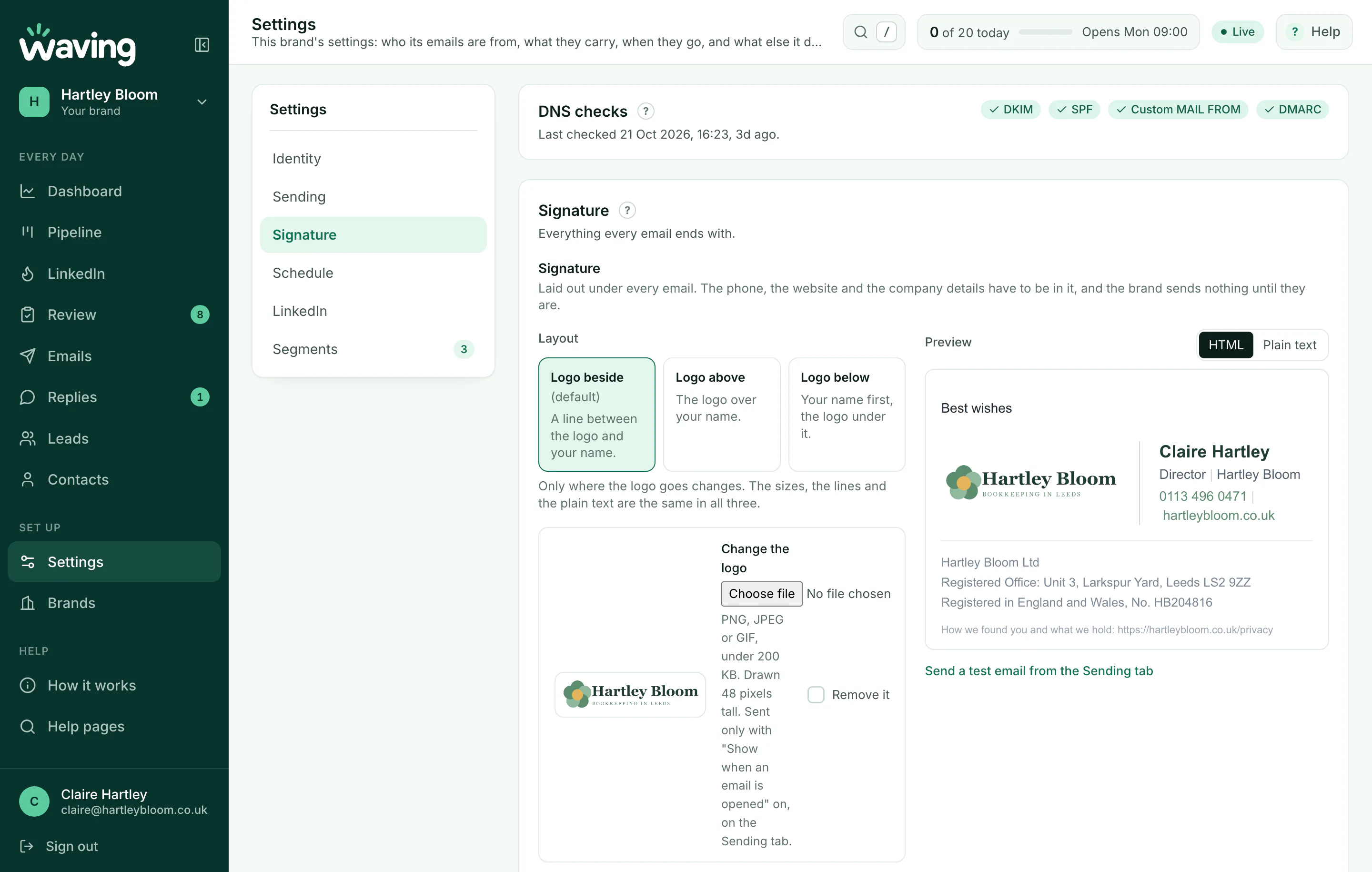
Tap the picture to see it full size.
Know it arrived, and who opened it.
The Sent page shows every email delivered, replied to, bounced or held up, as it happens. Switch on opens for a brand and you see those too.
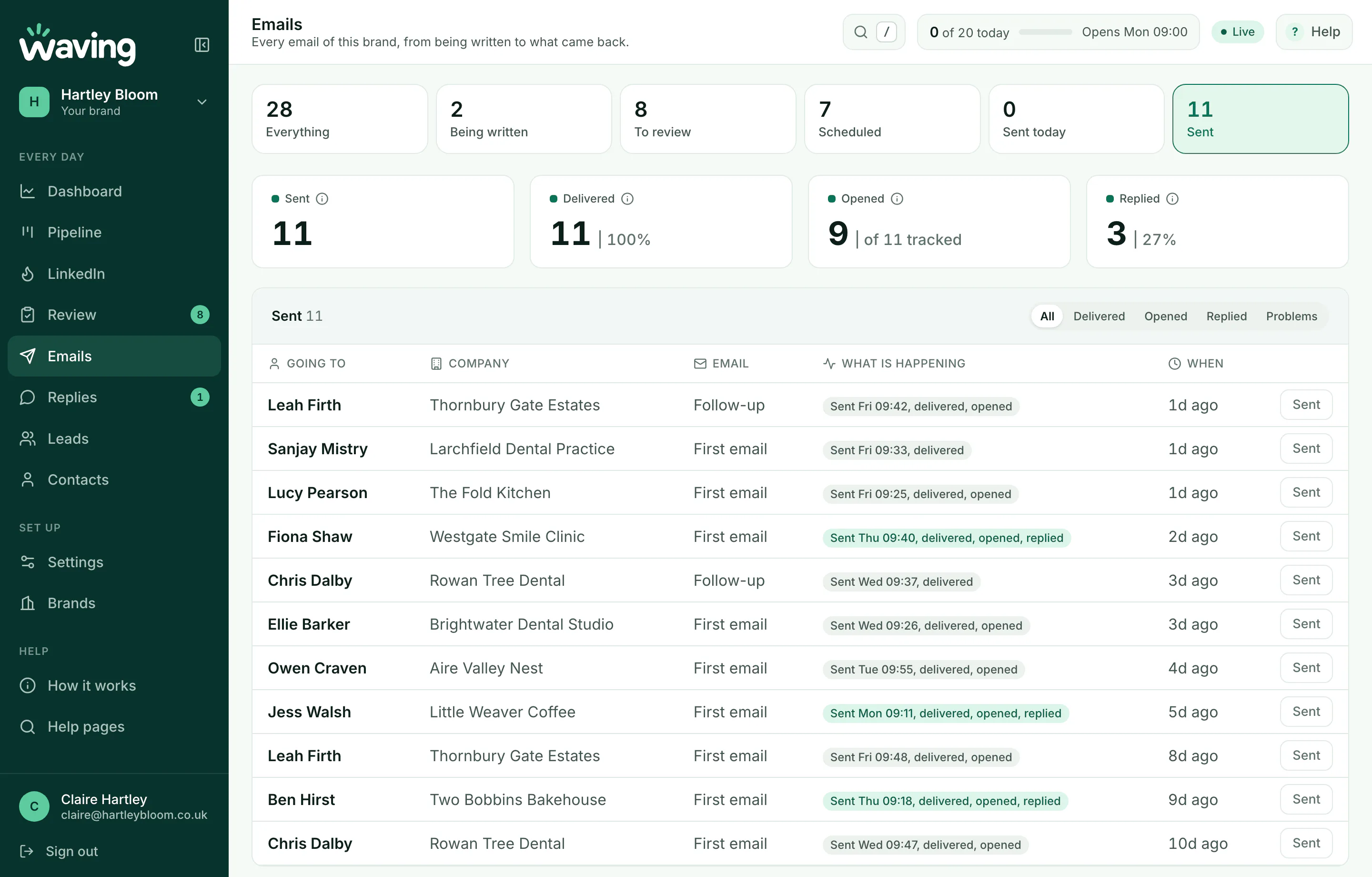
Tap the picture to see it full size.
Your day on one screen.
What is waiting for you, what went today against your limit, and leads, sent, replies and opens over the month. Several brands under one sign-in, each with its own domain, signature and dashboard.
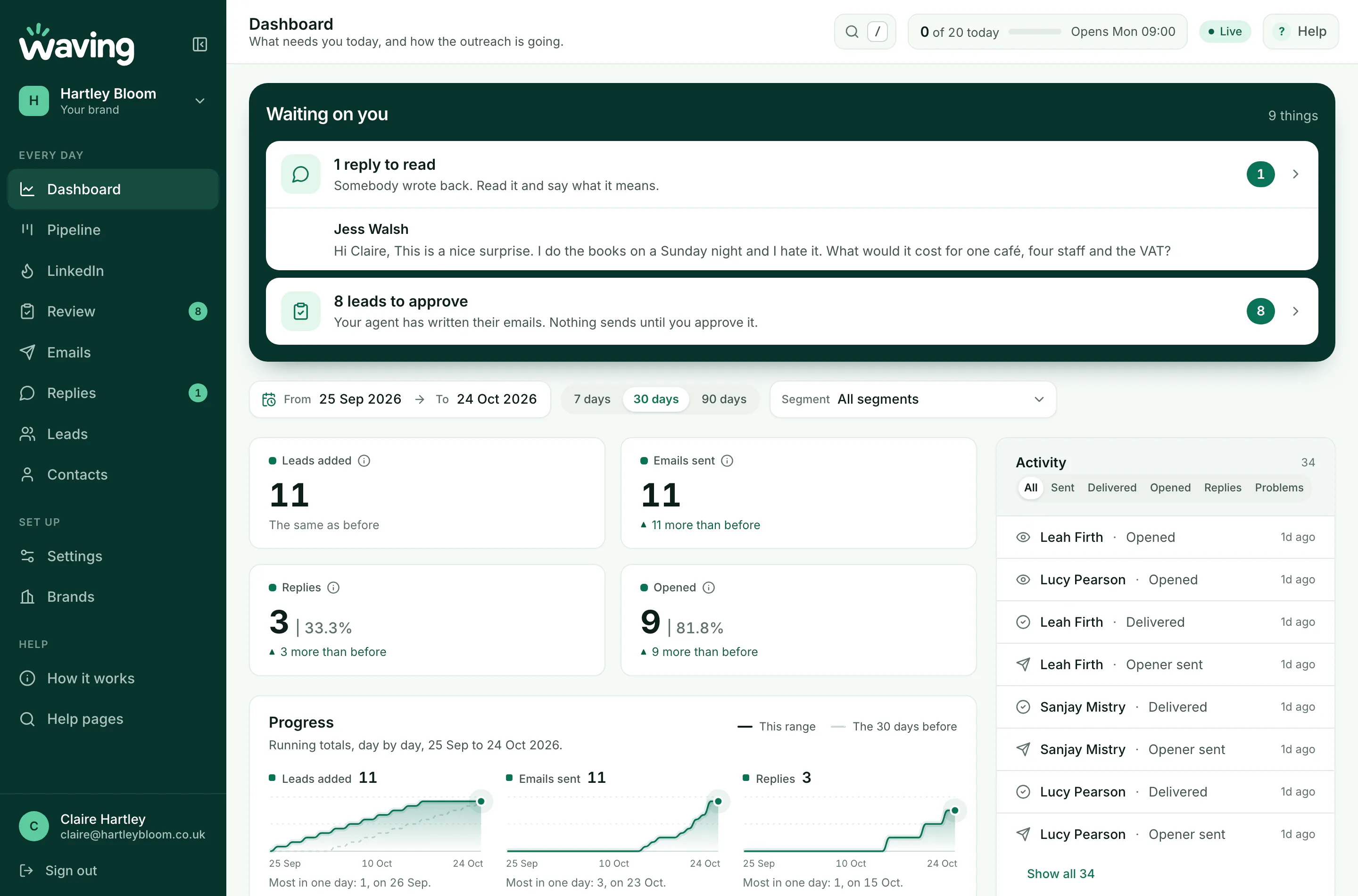
Tap the picture to see it full size.
Optional, and done by you
Warm them up on LinkedIn first, so the email does not land cold.
Before somebody's first email goes, Waving can put them on a short daily list. You like or comment on something they posted, and the email waits until you have.
-
1
A short list each day. Leads with a LinkedIn profile, capped to look after your own account.
-
2
You like or comment. Your own click, on a post worth saying something about.
-
3
The first email waits. It cannot be approved or sent until they are warmed.
-
4
It opens on their post. One natural line about the point they made. You read it first.
Waving never signs in to LinkedIn, never clicks or types there, and never reads your cookies. Every like, comment and connection is yours.
The Chrome extension
The same list in a side panel beside LinkedIn, so you never leave the page. Next opens their posts in your tab. Suggest reads the post you have open and drafts a comment, quick, considered or detailed, for you to copy and post yourself.
Compliance
Built for PECR and UK GDPR, with the checks in the software.
Waving enforces what software can enforce before anything sends. You are still the sender, so the list and the lawful basis are yours. The app makes the right thing the easy thing.
-
PECR checked at the door. Sole traders, ordinary partnerships and personal addresses are blocked unless you record consent.
-
Legitimate interest, written down. A legitimate interest assessment template is included.
-
A privacy notice in every first email. Every brand links to its own notice, so the recipient knows who has their details and where they came from.
-
An opt-out in your own words. Any reply stops the follow-up. A reply asking not to be contacted suppresses the address for good.
-
Full business disclosure, required. Nothing sends until the signature has your company name, number, place of registration, registered office, a phone number and a website.
-
Suppression by address and domain. Checked when added, when approved, and before sending.
-
Nobody contacted twice. Not from another of your brands, and not within ninety days.
-
No tracking unless you switch it on. Opens are off for every brand, and the app says what they need under PECR before you switch them on. Links are never rewritten.
Free, no sign up
Work out who to email, before you email anybody.
Outreach only works if the list is right. Build your ideal customer profile in a few minutes, or start from one written for your trade.
The ICP generator
Answer a few questions and get a plain text profile you can paste straight into Claude, Copilot or ChatGPT. Nothing you type leaves your browser.
Build mineTemplates by trade
A filled-in starting point for your line of work, with the sites to go after, who decides, and what to say.
- Estate agents
- Recruiters
- Accountants
- Cleaners and trades
- Training providers
Pricing
What it costs.
Simple, and the same for everybody. Prices include VAT, and nothing is charged until your account is live.
Solo
£25a month, including VAT
One business, one sender.
- One sending brand
- 500 sends a month
- 250 AI credits, enough to write every email you can send
- Your own lead sources. Apollo on your own account, or a list you upload
- Every guard and every check, and nothing sends until you approve it
Multi-brand Most room
£75a month, including VAT
Several businesses, or one with several sending domains.
- Several sending brands
- 2,500 sends a month
- 1,250 AI credits
- Your own lead sources. Apollo on your own account, or a list you upload
- Every guard and every check, and nothing sends until you approve it
Top-ups, not tier changes.£6 for 500 more sends. £12 for 250 more AI credits, including VAT. Buy them when you need them and not before.
One credit writes one lead.The first email and the follow-up, both. So 250 credits is 250 people written to properly, not 250 emails.
What 500 sends gets you.Cold outreach that is targeted well gets a reply from 1 to 5 in every 100, and up to 8 or 10 when it is targeted very well. So 500 sends is somewhere between 5 and 25 conversations. We would rather say that here than have you find out.
Questions
Not sure yet? Ask.
If something on this page is unclear, or your set-up is unusual, say so here and a person answers.
Ready to go? Create your account and you are set up in about ten minutes.
Sent.
Mark will reply to within a few working days.